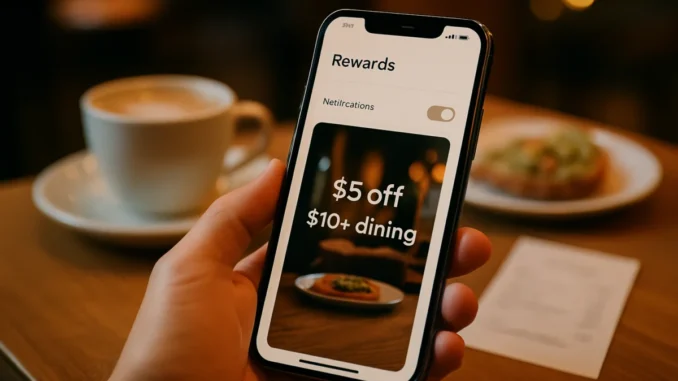
If you use inKind for dining rewards, there is a simple way to save right now. Some users are seeing an inKind $5 off $10+ offer after enabling notifications, and it can be a fast win if the deal shows up in your account. The catch is that it is not always easy to spot, which makes this one of those YMMV promotions worth checking carefully.
The offer appears under the Rewards tab rather than through a direct link, so it helps to know exactly where to look. If you have been waiting for a low-effort restaurant discount, this is the kind of app-based perk that can make a quick lunch or snack even more affordable.
How the inKind $5 Off $10+ Offer Works
This promotion is straightforward on the surface. Eligible users can get $5 off a purchase of $10 or more after enabling notifications in the inKind app. That means the discount can cover half of a small order, which is especially useful when you are already planning to dine out.
Because the offer is targeted, not everyone will see it. Some accounts may qualify immediately, while others may never receive it at all. That is why it is smart to check your own Rewards tab instead of assuming the deal is available across the board.
Where to Find the Offer in the App
According to the current reports, the promotion shows up under the Rewards tab. There is no direct offer link to click, so your best bet is to open the app and browse the available rewards manually.
If notifications are already enabled and you do not see anything, do not give up too quickly. A small app refresh can sometimes make the difference, especially if the reward is being served selectively.
Why Enabling Notifications Can Unlock Deals
Apps like inKind often use notifications to encourage engagement, and that can be the tradeoff for receiving a better offer. By allowing alerts, you may be signaling that you are an active user who is open to timely restaurant promotions and dining credits.
For deal hunters, that is a useful exchange. A single push notification can lead to instant savings, and in this case it could mean turning a modest meal into a much better value. More importantly, it takes very little effort to try.
There is also a practical angle here. Notifications can help you stay aware of limited-time perks, location-based bonuses, and reward changes before they disappear. If you already use the app from time to time, keeping alerts on may improve your chances of catching future offers as well.
What to Do If the Offer Does Not Appear
If you do not see the reward after enabling notifications, the common workaround is to disable them, restart the app, and then check again. That simple reset has helped some users surface the promotion when it was not showing before.
It is not a guaranteed fix, but it is worth trying before you move on. App settings can be finicky, and targeted deals sometimes need a refresh to populate correctly. A few taps can save you from missing a worthwhile discount.
Quick Troubleshooting Steps
Start by confirming that notifications are truly enabled at both the app and device level. Next, close the app completely, reopen it, and go back to the Rewards tab.
If the offer still does not show, try toggling notifications off and on again, then restart the app once more. In many cases, that is enough to trigger the reward if your account is eligible.
Best Ways to Use the InKind Dining Credit
Because this is a $5 off $10+ deal, it works best on smaller purchases where the discount has a bigger impact. Think coffee runs, quick lunches, appetizers, or a light meal rather than a full sit-down dinner.
That said, the offer can still be valuable even if you are spending a little more. Any time you can reduce a meal total without jumping through too many hoops, it is worth considering. The key is to use the discount while it matches your plans instead of forcing a purchase just to chase savings.
It also helps to pair the reward with a restaurant or merchant you were already considering. That way, you are getting real value instead of creating extra spending just to activate the deal. Smart redemption beats impulse redemption every time.
Should You Turn Notifications On for inKind?
If you already enjoy finding restaurant rewards, turning on notifications for inKind may be a worthwhile move. Even if this specific offer does not appear, the app could surface future savings that are equally useful.
On the other hand, if you prefer a quieter phone and do not use the app often, it may not be worth changing your settings for one promotion. The decision comes down to how much you value the possibility of short-term dining discounts versus keeping alerts to a minimum.
For many users, the answer is simple. If a quick app setting can unlock a $5 off $10+ reward, it is worth checking the Rewards tab, refreshing the app if needed, and seeing whether your account qualifies before your next meal.